Simply supported beam calculator inputs
Enter the beam span, material stiffness, section properties, and any loads you want to apply.
This page recalculates automatically, so there is no need to press Calculate after every change.
The results are solved in the browser and shown together with the formulas, sign diagrams, and substituted values.
Advanced numerical settings
Unit tip: keep the section units compatible.
If I is entered in in⁴, enter c in in.
The beam span can still be in ft or m. That avoids unit mistakes in the bending-stress formula
σ = Mc / I.
Point loads
Applied moments
Uniform distributed loads (UDL)
Linearly varying loads (VDL / trapezoidal)
How to use this calculator
1. Enter beam data
Set the beam length L, the report position x, and the material and section properties E, I, and c.
2. Add loads
Add any mix of point loads, applied moments, uniform distributed loads, and varying loads. Positions are measured from the left support.
3. Check units
Use consistent units. The beam span and the fiber distance can use different units, but c must match the unit system of I.
4. Read the results
The page updates automatically and reports reactions, shear, moment, slope, deflection, stress, and applied-load totals.
Beam calculation results
Values are shown at the selected position x = 10 and as absolute extrema over the full beam span.
Shear force and bending moment charts
These live diagrams update with your current inputs and unit selections. The dashed line marks the selected report position x.
Applied loads summary
This section shows the totals of all loads and applied moments currently on the beam.
Simple beam sign convention drawings
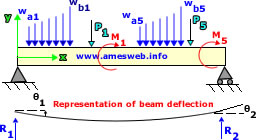
These simple SVG drawings show each case separately so the sign convention is easier to understand.
Positive uniform distributed load
Positive varying distributed load
Positive applied moment
Positive support reactions
Positive shear at a cut
Positive bending moment at a cut
Beam model and x direction
Beam calculation details and formulas
The formulas below show how the simply supported beam reactions, applied loads, internal forces, slope, deflection, and bending stress are calculated using your entered values.
Sign convention used
- x is measured from the left support.
- Downward applied loads are entered as positive.
- Positive applied moments follow the moment drawing shown above.
- Positive shear acts upward on the left face of the cut.
- Positive bending moment is sagging.
- Positive bending stress is reported from $\sigma = Mc/I$ using the chosen sign of $M$.
Worked example
Use this sample problem to see how the calculator works in practice.
It loads a 20 ft beam with a point load, an applied moment, a full-span UDL, and a triangular load segment.
- Beam length: 20 ft
- Report position: 10 ft
- Point load: 1000 lbf at 6 ft
- Applied moment: 1500 lbf·ft at 10 ft
- UDL: 50 lbf/ft from 0 to 20 ft
- Triangular load: 0 to 120 lbf/ft from 5 ft to 15 ft
- E: 29,000 ksi
- I: 200 in⁴
- c: 6 in
Click the button below, then review the reactions, diagrams, and values at x = 10 ft.
This is a good way to verify the load definitions and learn the input format.
FAQ
Can I mix point loads, applied moments, UDLs, and varying loads?
Yes. Any combination of supported load types can be included in the same simply supported beam model.
Are the reactions exact?
Yes. The support reactions are obtained from static equilibrium using exact resultants and centroids for each distributed-load segment.
Does the page update automatically?
Yes. The page recalculates whenever you change a beam input, unit selection, or load value.
Does numerical resolution affect the calculation?
Yes, but mainly for slope and deflection because those are obtained by numerical integration. Support reactions and load resultants come from equilibrium and exact segment resultants, so they are not meaningfully affected by the numerical resolution setting.
Which beam theory is assumed?
Euler–Bernoulli beam theory, small deflections, constant material modulus, and constant second moment of area along the span.